















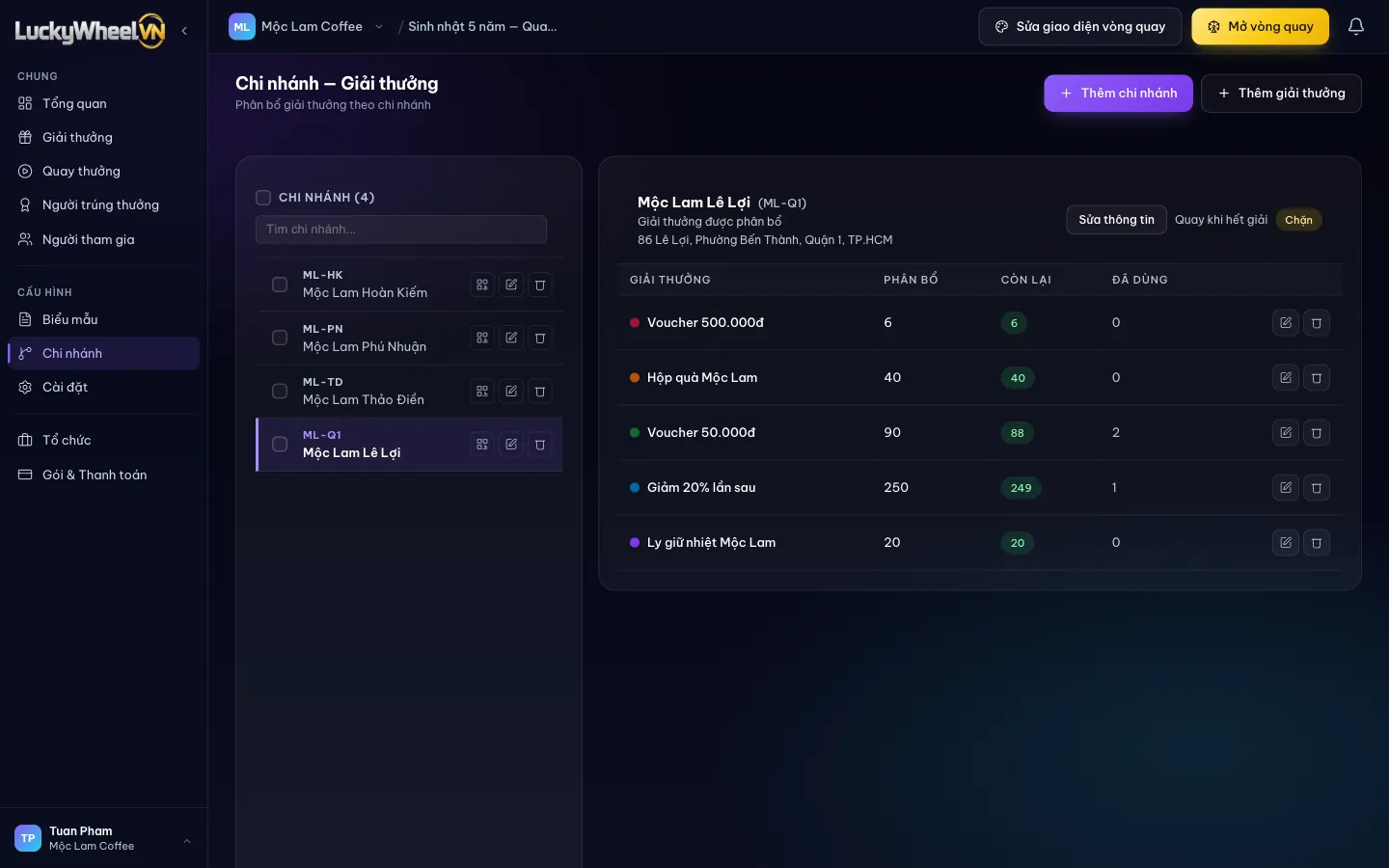
Open the Branches page
Choose Branches in the Configuration group. The branch list is on the left; click a branch to see the gifts allocated to it.
- 1The Branches item in the Configuration group.
- 2Branch list and a search box for name or code.
- 3The QR icon opens the branch's own spin link.
- 4Spin when out of prizes: Blocked (default) or Allowed to take gifts from the shared stock when the branch runs out.
- 5Allocation table: Allocated, Remaining and Used for each prize.
- 6Add prize to allocate more gifts to the selected branch.
Create a branch
Click Add branch and enter a name, a code (leave empty to generate one) and an address. You can create several branches at once. To let a store manager check winners and hand out gifts, go to your organisation’s Members page, invite them with the Branch manager role and pick the campaign and branches they look after.
Allocate gifts to a branch
Select a branch, click Add prize, choose a prize and enter a quantity. Customers who spin at a branch win from that branch's share of gifts.
- 1Choose a prize from the list on the Prizes page.
- 2Quantity to allocate to this branch.
- 3Save the allocation.
Wins at a branch are deducted from that branch's Remaining column, not from the Remaining / Total column on the Prizes page. Track each location's stock right on this page.
Print a separate QR for each branch
Click the QR icon next to a branch name to open the Spin page QR. The link in the QR already includes the branch, so spins are recorded at the right location.
- 1Download QR to print and stick at the counter.
Frequently asked questions
Which login does a store manager use?
Creating a branch does not create an account. Invite the person on the Members page with the Branch manager role and choose the campaign and branches; they only see data for those branches. What this role can view or edit is set on the campaign’s Settings page.
Can customers still spin when a branch runs out of gifts?
Not by default (Blocked). Switch to Allowed so the branch takes gifts from the shared stock once its own share is gone.
Can customers choose their own branch?
Yes. Turn on Show Branch Field on the Form fields page and customers pick a branch in the form. Using each branch's own QR means fewer wrong picks.
Can I delete a branch that already has spins?
Usually not, because spins or winners are already linked to that branch.