














Open the Winners page
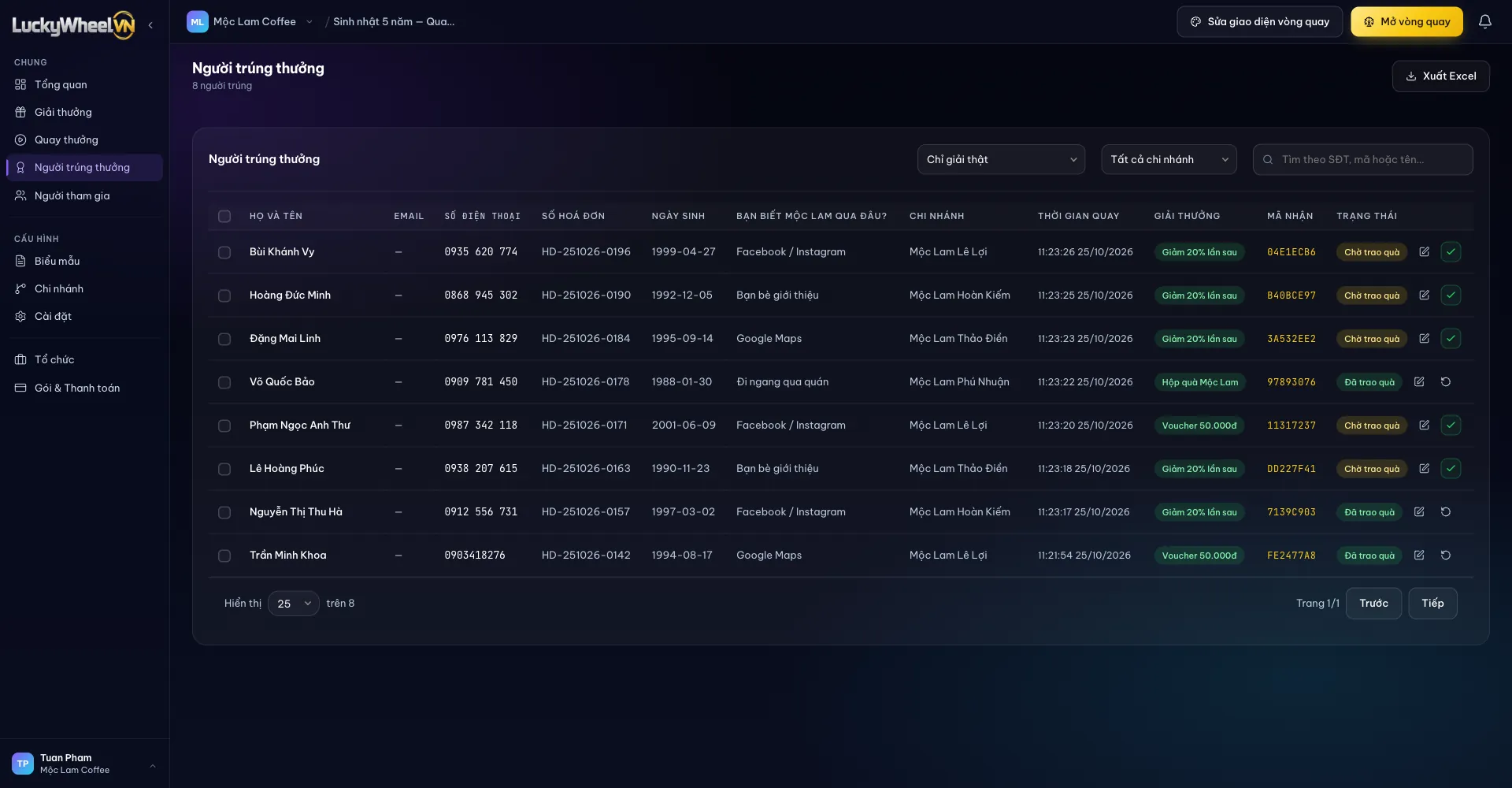
Choose Winners in the left sidebar. By default the table shows only real prizes, not "Better luck next time" spins.
- 1The Winners item.
- 2Filter Real prizes only or All (including no-win), and filter by branch.
- 3Search by phone number or name.
- 4Claim code: the code the customer sees on the result screen.
- 5Status: Pending or Delivered.
- 6The edit prize button and the confirm handover button.
- 7Export Excel using the current filters.
Hand out gifts at the counter
The customer shows the result screen or the saved image. Staff search for the customer by phone number, compare the Claim code on the image with the code in the table, hand over the gift, then click the tick button to switch to Delivered. If you click by mistake, choose Revert to pending.
Each claim code belongs to exactly one win. If the customer's code doesn't match any row, don't hand over the gift; check the phone number and spin time again.
Swap the prize for a winner
When the won prize is no longer in stock, click the pen icon on that row, choose a New prize, then Save changes. The old prize gets 1 added back to stock, and the new prize has 1 deducted.
- 1Prize list with remaining quantities; out-of-stock prizes cannot be selected.
- 2Save changes.
Export the list for reconciliation
At the end of the day or the campaign, click Export Excel to get a file with every form column, branch, spin time, prize, claim code and handover status. Filter by branch before exporting to get a separate report for each location.
Frequently asked questions
Can branch staff see this page?
Yes. A branch account only sees its own branch's winners. Edit rights are turned on by the campaign owner on the Settings page.
If I delete a winner, does the gift go back to stock?
Yes. When you delete a row, its gift is added back to the right stock (branch or shared).
Why can't I see the "Better luck next time" spins?
The default filter is Real prizes only. Switch to All (including no-win) to see them.
What if the customer lost the result image?
Search by phone number or name, check the details the customer entered in the form, then hand over the gift as usual.